JSCAPE version 2026.3.1.560 now available | Download here.

Category: Tutorials
-

How to import & export triggers
If you’ve been using JSCAPE MFT Server, you know how important triggers are in automating business processes. In fact, many of our…
Learn More
-

Monitoring an amazon s3 folder and transferring newly added files to azure
When you have a multi-cloud infrastructure, there will be several instances when you’ll want to transfer data from one cloud platform to…
Learn More
-

How to download newly added files from an AWS s3 folder
Organizations with hybrid infrastructures consisting of cloud-based and on-premise solutions will usually need the ability to conduct automated data transfers between these…
Learn More
-

Oracle JDK to OpenJDK migration on linux
Some JSCAPE MFT Server customers are looking to migrate to OpenJDK distributions in order to avoid the Oracle Java paid subscriptions. JSCAPE…
Learn More
-

Migrating from oracle JDK to OpenJDK on windows
JSCAPE MFT Server customers who want to avoid the Oracle Java paid subscriptions can simply migrate to any of the free open…
Learn More
-

Set up automated file transfers with windows SMB share
One of the most common ways of transferring data between Windows servers is through the Server Message Block (SMB) network file sharing…
Learn More
-

How to schedule automated dropbox file transfers
The ability to perform automated file transfers to a cloud-based storage solution like Dropbox can be a valuable asset to businesses who…
Learn More
-

How to use DropBox as cloud storage for your MFT server
Last time, we taught you how to configure JSCAPE MFT Server so that files uploaded via FTPS, SFTP, HTTPS, and other file…
Learn More
-

How to use box as cloud storage for your MFT server
A file transfer server that stores user files in cloud storage solutions has many advantages. This would mean, your storage would be…
Learn More
-

How to schedule automated file uploads from your server to box cloud storage
The ability to transfer files automatically to a cloud-based storage solution like Box.com can be a valuable asset to businesses who want…
Learn More
-

How to install MFT synchronizer agent on windows
In this tutorial, we’re going to show you how to install JSCAPE MFT Synchronizer Agent on a Windows host. Agents are used…
Learn More
-

How To Append a TimeStamp To Each File Downloaded From Another Server
Overview Whenever we download files from an external server on a regular basis, we often like to rename each file so that…
Learn More
-

How to do an iPad or iPhone file transfer
Overview In this tutorial, I’ll show you how to carry out file transfers between an iPhone or iPad and JSCAPE MFT Server.…
Learn More
-

Scheduling an automated file transfer for files matching a regex
One of the reasons why our clients love Triggers is because this feature makes it so easy to set up unmanned, automated…
Learn More
-

AS2 message tutorial on applying digital signatures
Overview As promised in our last post, we’ll be teaching you how to set up your AS2 Server to use digital signatures…
Learn More
-

Applying AS2 Encryption
Overview If your AS2 connection already runs over HTTPS, your EDI messages should already be protected by the data-in-motion encryption that comes…
Learn More
-

Excluding passive IP for internal FTP/S connections to your reverse proxy
Overview Last time, we tackled the problem system administrators encounter when their passive FTP or FTPS connections have to pass through a…
Learn More
-

How To Update JSCAPE MFT Gateway Agents for Windows
In order to avoid compatibility issues between your MFT Gateway server and MFT Gateway Agent installations, it’s important to keep your MFT…
Learn More
-

Using a remote FTP/S service as network storage for your MFT server
JSCAPE MFT Server’s Network Storage module (formerly known as Reverse Proxy) makes it possible to extend the storage of your managed file…
Learn More
-

Using a remote SFTP service as network storage for your MFT server
JSCAPE MFT Server’s Network Storage module (formerly known as Reverse Proxy) allows you to utilize various remote services and storage solutions as…
Learn More
-

How to set up an SFTP reverse proxy in JSCAPE MFT gateway
Overview An SFTP reverse proxy adds another layer of security to SFTP services. In addition to SFTP’s ability to encrypt data in…
Learn More
-
How to send messages to amazon SQS queues using JSCAPE MFT server
In this post, you’ll learn how to configure JSCAPE MFT Server to send messages to Amazon SQS queues. Amazon SQS queues are…
Learn More
-

Sending SMS notifications of JSCAPE MFT server events via amazon SNS
In a previous post, we outlined the steps of setting up JSCAPE MFT Server to publish messages to Amazon SNS. This setting…
Learn More
-

How to publish messages to amazon SNS using JSCAPE MFT server
In this post, you’ll learn how to publish messages to an Amazon SNS (Simple Notification Service) topic using JSCAPE MFT Server. There…
Learn More
-

How to use google storage as the file storage system of your MFT server
In this tutorial, you’ll learn how to configure JSCAPE MFT Server so that files uploaded to it are streamed directly to Google…
Learn More
-

Preparing trading partner servers for SFTP automation
Overview In order to keep transactions secure, you and your trading partners likely use SFTP and other encrypted protocols for your automated…
Learn More
-

MFT security tip: including uppercase and lowercase letters in passwords
In today’s security tip, we talk about including uppercase and lowercase characters in passwords. This is related to our previous video about…
Learn More
-

Logging MFT server log data in a database
By default, JSCAPE MFT Server records domain logs in log files. While in most cases, this will do, some organizations prefer to…
Learn More
-

MFT security tip: use long passwords
It’s time for another MFT Security tip. Today, let’s talk about long passwords and why you would want to require your users…
Learn More
-

Setting SFTP algorithms on your SFTP server
Overview In this post, we’ll discuss the algorithms in a typical SFTP server and explain their basic functions. We’ll cover algorithms for…
Learn More
-
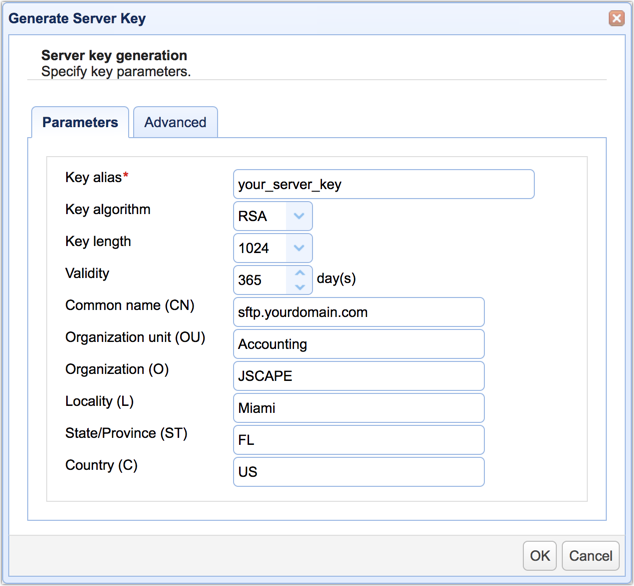
Guide on how to set up an SFTP server
Overview This post is for those of you who want to dive right into the steps of setting up a SFTP server.…
Learn More
-

How to prevent duplicate trigger actions
One of the challenges of setting up an MFT Server active-active high availability cluster is in preventing duplicate trigger executions, especially for…
Learn More
-

[Video] blocking suspicious IP addresses when MFT server is behind MFT gateway
This is a video version of the tutorial “How To Block Suspicious IP Addresses When MFT Server Is Behind MFT Gateway“. Here,…
Learn More
-
Use azure files as the file storage system on JSCAPE MFT server
We just published a video version of the blog post, Using Azure Files As The File Storage System Of Your MFT Server.…
Learn More
-

How to schedule automated file uploads from your server to google storage
We’ve already showed you how to configure JSCAPE MFT Server to monitor a directory for newly added files and then upload those…
Learn More
-

Video: How to connect and upload files from your server to an azure file share
We just published a video version of the tutorial “How To Connect And Upload Files From Your Server To An Azure File…
Learn More
-

How to block suspicious IP addresses when MFT server is behind MFT gateway
If you’ve been using JSCAPE MFT Server, you probably already know it has a built-in feature that enables it to block suspicious…
Learn More
-
Using azure files as the file storage system of your MFT server
It’s possible to configure JSCAPE MFT Server so that the files your users and other client applications upload to your server are…
Learn More
-

How to connect & upload files to azure storage
In this tutorial, we’re going to show you a simple method that will enable you to connect your server to a Microsoft…
Learn More
-

Load balancing on FTP servers for high availability
This post was originally published on July 8, 2012 but was updated on October 27, 2018 Overview In this post, I’m going…
Learn More
-

How to push files automatically from a remote linux host with no file transfer service
Learn how to PUSH files from a remote Linux host even if that host doesn’t have any file transfer service (FTP, SFTP,…
Learn More
-

How to pull files automatically from a remote linux host with no file transfer service
Learn how to pull files automatically from a remote host that has no built-in file transfer service whatsoever.
Learn More
-

How to setup a reverse proxy to FTP in 3 simple steps
Overview Do you have an FTP server behind the firewall that you need to make accessible via the Internet? Here is a…
Learn More
-

How to install MFT synchronizer agent on linux
MFT Synchronizer Agent is the answer if you need to transfer files between two hosts and one host doesn’t have any file…
Learn More
-

Video guide for installing MFT synchronizer on windows
Learn how to install JSCAPE MFT Synchronizer on Windows through this video.
Learn More
-

[Video] acquiring MFT server configuration data from an existing datastore in MySQL
Adding nodes to a JSCAPE MFT Server high availability cluster, typically entails setting up each MFT Server instance to acquire their server…
Learn More
-

[Video] migrating MFT server config data from the h2 DB to a MySQL DB
If you store your JSCAPE MFT Server configuration data into an external RDBMS like MySQL, it will make it easier for you…
Learn More
-

How to setup a FTP reverse proxy
Note: This blog post was originally published on July 19, 2012 but was updated and republished on September 19, 2018 Overview I’m…
Learn More
-

How to fetch files from multiple SFTP servers and then send to a trading partner
Learn how to configure JSCAPE MFT Server to fetch files from multiple SFTP servers and then send those files to a trading…
Learn More
-

How to list files uploaded to your server
A quick video demonstrating how to set up JSCAPE MFT Server to automatically list files as they’re uploaded to your server.
Learn More
Browse by category
-
(23)
-
(43)
-
(7)
-
(47)
-
(57)
-
(40)
-
(19)
-
(623)
-
(3)
-
(390)
-
(106)
-
(6)
-
(19)
-
(199)
-
(22)
-
(86)