
Overview: What is a Digital Certificate?
When users come to your website, they have a way of telling whether your site is safe to connect with or not. It comes in the form of something called a digital certificate. Today, we’ll help you understand what a digital certificate is, its key components, the role it plays in Web security, and other concepts associated with it. After you read this article, request a demo from the JSCAPE experts and get personalized experience.
What a digital certificate is in a nutshell
A digital certificate primarily acts like an identification card; something like a driver’s license, a passport, a company ID, or a school ID. It basically tells other people who you are. So that, for example, when a user arrives at your site looking for yourdomain.com, your site’s digital certificate (a.k.a. cert) will help that user confirm whether he actually landed at yourdomain.com.
In addition, a cert also holds a copy of your site’s public key, which is used in encrypting data transmitted between your site and the user’s web client (in most cases, a web browser).
Not all websites offer digital certificates. In the past, the use of digital certificates were mostly limited to sites with whom users had to engage in secure transactions or share sensitive information. For instance, you normally encountered certs on online banking websites, secure file transfer servers, major e-commerce sites, or EDI servers. But because users are now becoming more conscious about web security, more and more sites are employing digital certificates to gain users’ trust.
You won’t actually see the entire digital certificate as you connect to a site. However, you’ll easily know it’s there. Websites protected by certs usually display a lock icon followed by “https” on the leftmost part of that site’s URL when viewed on your browser’s URL bar. To view the contents of the cert, just click on the lock icon.

Most digital certificates in use today follow what is known as the X.509 standard. X.509 is used in SSL (Secure Sockets Layer) and TLS (Transport Layer Security), so yes, it’s what’s being used in HTTPS, FTPS, WebDAVS and other secure data transfer protocols. Let’s now take a look at the kind of information you’ll find in this kind of certificate.
Contents of a X.509 certificate
The contents of a digital certificate typically include the following:
- Information about the subject a.k.a. Subject Name – “subject” refers to the site represented by the cert.
- Information about the certificate issuer/certificate authority (CA) – The CA is the body that issued and signed the certificate. More about this shortly
- Serial number – this is the serial number assigned by the issuer to this certificate. Each issuer must make sure each certificate it issues has a unique serial number.
- Version – the X.509 version used by a given certificate. These days, you’ll usually find version 3.
- Validity period – certs aren’t meant to last forever. The validity period defines the period over which the cert can still be deemed trustworthy.
- Signature – This is the digital signature of the entire digital certificate, generated using the certificate issuer’s private key
- Signature algorithm – The cryptographic signature algorithm used to generate the digital signature (e.g. SHA-1 with RSA Encryption)
- Public key information – Information about the subject’s public key. This includes:
- the algorithm (e.g. Elliptic Curve Public Key),
- the key size (e.g. 256 bits),
- the key usage (e.g. can encrypt, verify, derive), and
- the public key itself
Certificate Key
While most of the contents of a digital certificate are there for providing information regarding the subject, the issuer, or the certificate itself, the certificate key or public key has a special purpose. It’s a vital component in the encryption of data exchanged between the server and the client. If you’re not familiar with public keys and their role in encryption, I suggest you read about symmetric and asymmetric encryption.
Certificate Authorities
Another element of a digital certificate that does more than provide information is the certificate’s digital signature. As mentioned earlier, the certificate’s digital signature is generated using the certificate issuer’s private key. If you’ve read the article on digital signatures, you know that a cert’s digital signature can be used in authentication. But in order for a web client to verify/authenticate a digital signature, it will need a copy of the issuer’s public key.
If the issuer happens to be a widely recognized certificate authority (CA), that won’t be a problem. A copy of that CA’s public key will likely be pre-installed in the user’s web browser. Popular Web browser’s like Chrome, Firefox, Safari, and Internet Explorer all come with the certificates of recognized CAs. That means, they already contain copies of those certificate authorities’ public keys and can therefore be used for verifying certificates issued/signed by them.
Certificates signed by widely recognized CAs are called signed certificates. There are also certificates that are simply signed by issuers who aren’t widely recognized certificate authorities. For example, when you create your own digital certificate using JSCAPE MFT Server but don’t bother processing a Certificate Signing Request (CSR), you will end up with what is known as a self-signed certificate.
If you want to see how a digital certificate is created, read the article How To Set Up A HTTPS File Transfer, especially the section entitled Preparing Server Keys.
Signed vs Self-signed certificates
In theory, certificate authorities are supposed to exercise due diligence before signing digital certificates submitted to them through CSRs. They need to verify first whether the information placed on the digital certificates are in fact true. This is important because their attestation would later on serve as the sole basis that certain websites who are able to present certs signed by them can really be trusted.
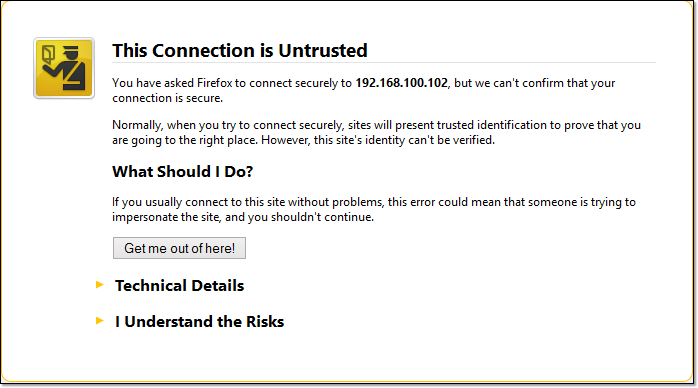
So, assuming due diligence is really exercised, it would be safe to assume that signed certificates are more reliable and trustworthy than self-signed certificates. In fact, when a user attempts to connect to your site and your site only has a self-signed certificate, the user’s browser will display something like this:
Self-signed certificates are relatively safe to use internally, i.e., within your organization, where you have more control over the servers that operate in the network. So, for instance, you can use it to add security to a web file transfer that takes place behind your corporate firewall.
Let’s end this for now.
We’ll continue our discussion on digital certificates on our next post, where we’ll talk about the process involved when a web client connects with a web server via HTTPS.
Related articles/documents
Choosing Between SSL Implicit, Explicit, and Forced Explicit Modes
Get Started
JSCAPE MFT Server is a managed file transfer server that allows you to create digital certificates and set up web-based file transfers.