
Overview: How To Send Large Files Through Email
This is the first of what I expect to be a 4-part series of posts detailing how you can send large files through email. Here in Part 1, we’ll talk about the motivations of doing it and the limitations of most email services. We’ll also give you an overview of a method that will allow you to circumvent those limitations. A method that is most suited for businesses, where large file attachments must be sent securely, reliably, and efficiently.
Why send large files via email?
In today’s social media-dominated world of communications, one ancient application has still managed to hold its ground in the enterprise – email. I don’t know the exact statistics, but I’m pretty sure many of you already checked your email inbox more than once today before coming across this article.
We’ve become so beholden to email, that we often think we can send just about anything through it. Sometimes, even insanely large files.
The problem is, almost all email services impose size restrictions to your file attachments. In most cases though, we don’t feel those restrictions because most of the files we attach are just a few Megabytes. But you know how large file sizes can sometimes grow these days.
There are:
- image-heavy PowerPoint presentations;
- overloaded zip files;
- HD video files;
- super sophisticated CAD files;
- overgrown PDFs;
- and many others
Once your employees hit that size limitation and can’t accomplish whatever it is they want to, they’ll start looking for alternatives – like cloud-based file sharing services. If you’re operating in a highly regulated industry like healthcare or finance, that might not be a good idea. Read the article How To Send Large Files Over The Internet to understand why.
Sometimes, some of your employees might be tech-savvy enough to set up rogue file transfer servers. That too can be a headache. Click that link to find out why.
Basically, if you’re conscious of data security and privacy, you wouldn’t want your employees to go wandering into some solution that’s not being managed and monitored by your IT department.
Here’s a solution that will enable your employees to stick with email and still be able to send large files. What’s more, they’ll be able to do it in a secure, reliable, and efficient manner. It’s called ad hoc file transfer.
What ad hoc file transfer is
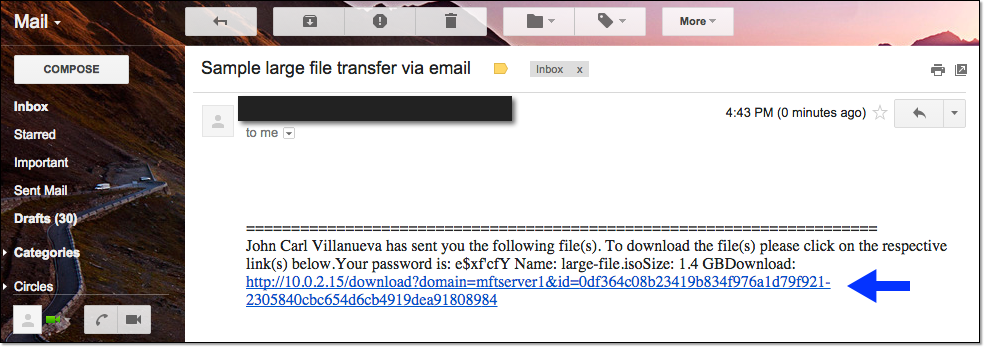
Ad hoc file transfer is a solution that combines the familiarity of email with the security of managed file transfer. When you send a file via ad hoc file transfer, your entire email message will proceed to your email service provider, which will in turn forward it to the intendend recipient as normal. The file, however, will actually be sent over a secure connection to a managed file transfer server, where it can be PGP-encrypted, logged, auto-scanned for viruses, and placed under a variety of security controls.
As soon as the recipient receives the email message, he’ll see a link embeded in it. When clicked, that link will connect the recipient to your MFT server, where he can enter a password and download the file you sent him over another secure connection.
Here’s an illustration showing how it works when applied via an MS Outlook plugin.
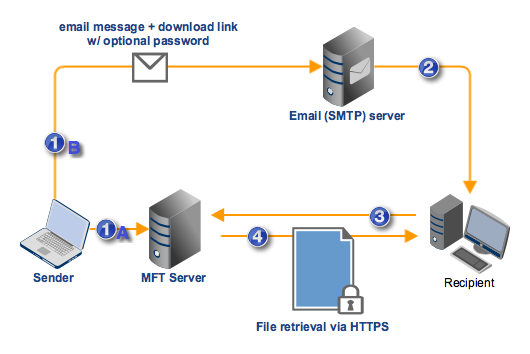
- MS Outlook plugin strips the attachment from the email message and:
- 1A. Uploads the file attachment to MFT Server.
- 1B. Attaches a download link and optional password (both obtained from JSCAPE MFT Server) to the message, and then forwards them to the SMTP server.
- SMTP server forwards the email message + download link + optional password to the recipient
- Recipient clicks on the hyperlink and is connected to MFT Server via HTTP/S. In addition, he enters the required password if the link is password protected.
- File is downloaded by recipient from MFT Server via the same HTTP/S connection
All of this happens behind the scenes. To the sender and recipient, the entire process will appear to them as regular email.
Kinds of ad hoc file transfer
Ad hoc file transfer can be carried out through either one of three (3) methods:
- MS Outlook plug-in – Designed for MS Outlook, this ad hoc file transfer plugin will allow your users to send files through the most widely used email client. Once the plugin is installed, sending large files via email will be as easy as pie.
- Web browser – For those who don’t have Microsoft Outlook on hand (or simply prefer not to use it), your ad hoc file transfer service can also be accessed thru any Web browser, including Chrome, Firefox, Internet Explorer, and Safari.
- Mobile apps – Built for road warriors, JSCAPE’s iOS and Android File Transfer Clients can come in handy especially when you’re travelling and need to quickly email a large or confidential file stored on your company server.
Learn how to implement ad hoc file transfer
In the succeeding posts, we’ll teach you how to send large files through email using ad hoc file transfer. In How To Send Large Files Through Email – Part 2, we’ll walk you through the steps of setting up ad hoc file transfer on JSCAPE MFT Server. After that (in Part 3), we’ll proceed to setting up the plugin on MS Outlook. Then in Part 4, we’ll show you how to perform ad hoc file transfer on your favorite Web browser.
You’ll need a running instance of JSCAPE MFT Server to follow the steps in the succeeding posts. Not to worry. JSCAPE MFT Server has a fully-functional evaluation edition that you can download for FREE.
Before proceeding to the next part, you might want to start installing JSCAPE MFT Server first. You can find the documentation here.
Or, if you’re interested, you can also dig into our huge collection of managed file transfer articles and discover the many secure data transfer features this powerful server application has to offer.